Your Internet marketing campaign always has room for improvement. The most successful companies make a commitment to kick-starting their latest marketing campaigns. There are a range of tools for Internet marketing online that can allow you to carry out tasks necessary to making yourself into a success.
In this guide, you are going to be introduced to some of the key online marketing tools that will help you to make your next campaign a success.
1. Google Alerts
Google Alerts will help you to do many things. First of all, you can monitor your own online reputation through gaining an alert every time someone mentions your brand. This can be invaluable because that will alert you to any negative feedback you’re getting before it can cause too many problems.
Another benefit of using Google Alerts is that you can review the latest developments going on in your industry. Each day you can receive an email digest of what’s going on in your niche.
2. Hootsuite
The Hootsuite tool is one social media management option that will help you to save a lot of time and effort. It’s easily the most popular free tool on the market today because of how easy it is to manage all social media updates and to schedule future posts.
This personal social media management tool will increase your productivity and make it easy to spot trends. You also gain access to a range of analytical tools with it.
And if you want to upgrade, which absolutely isn’t necessary, the paid version is well worth it.
3. LinkedIn Advanced Search
You may say that LinkedIn Advanced Search is just a function of the platform itself, and to an extent you would be right. But what you have to remember is that LinkedIn killed off the Sector Skills tool because they wanted to make money from it, and they broke it in the process.
Advanced Search is the easiest way to find influencers that you can work with in the area of business. If you don’t work as a business, or LinkedIn isn’t your scene, there are plenty of other tools, such as Kred and Klout to measure someone’s online reputation.
4. Google Keyword Planner
Formerly known as the Google Keyword Tool, the Google Keyword Planner makes it easy to understand customer search behavior. If you are running an SEO campaign, the keyword planner will make it a matter of simplicity to discover what people are searching for, along with how much competition you are likely to run up against by aiming for those same search terms.
Since it comes with so many tools, you can combine this with Webmaster Tools to cover all the bases when it comes to search.
5. Similar Web
The Similar Web freemium tool was launched way back in 2013. It started out as a tool that offered free stats on all sites, including referral sites. This is superior to Google’s similar tool the Ad Planner because it isn’t restricted just to media sites. You can use it on absolutely any website on the Internet to get an idea of a brand’s stats.
This is a great method to make sure that you have competitor site benchmarking covered. You can even combine it with tools like Compete and Alexa for reliable results inside the US.
Visible PPC
5535 N Military Trl Apt 1812
Boca Raton, FL, 33496
(561) 305-2253 http://visibleppc.com
26.396,-80.121
from Visible PPC Blog http://blog.visibleppc.com/5-free-online-marketing-tools-to-kickstart-your-internet-marketing-campaign/
Main Website http://visibleppc.com
AdWords is one of the most successful marketing channels. And, now it’s about to get a little noisier. On May 24, 2016, Google announced at the Google Performance Summit some significant changes to Adwords introducing the “next generation of local search ads.”
Local ads are evolving as search does. Almost a third of mobile searches have local intent, which means it’s time for brands to start thinking about how to connect with local consumers if they’re going to be competitive. If you want to win on the local SERPs, it’s time to dig deep and get involved with Google’s new local search ads.
At this point in search, all of us have the ability should know more about our customers than ever before. Between buyer personas and Google Analytics audience reporting, you can identify what your audience wants and needs. With the right guidance from Google, you can put your historical customer data to good use that help target online and offline customers with these new local search ads.
Whether you’re looking for Google Map users that are biking, running, or driving nearby or Google.com searchers that are browsing online at home, you will have the ability to target customers with “promoted pins” or “promoted locations.”
The trick to getting the most out of your new local search ads is to take advantage of these early movements and get into the idea of updating your local listing, all the time.
That is what this post is about.
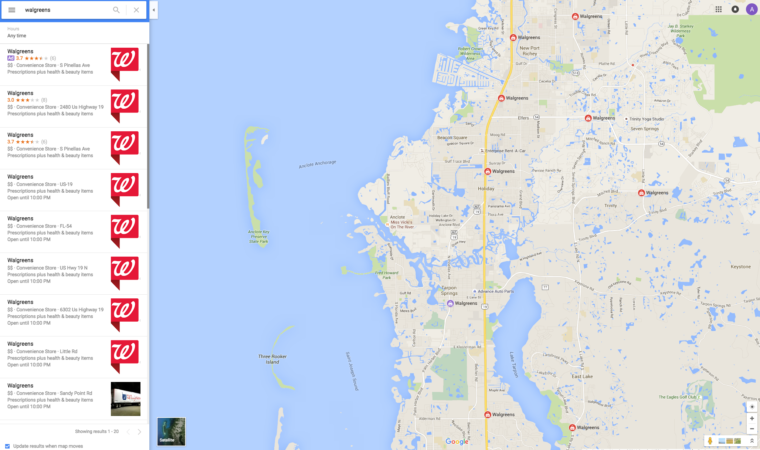
This example courtesy of Google is how new local search ads will appear on Google Maps. It’s from Walgreens.
Now, take a look at the Walgreens example below. Can you see the difference between a promoted location and an organic location? (Hint: Look for the color purple.)
There are three things that are required to be eligible for local search ads on Google Maps:
You must set-up a Google My Business account.
You must have an active Adwords account.
Finally, you must sync the location extensions together.
Walgreens is an awesome company with a lot of very smart people working on these new local search ads (shout out!).
As you can see from the Walgreens example I shared above; there is a promotion for $3 off contact lens solution under the map in the store information section. Google is redesigning their local business pages to highlight the new changes to local search ads. And, you’ll notice a few other big changes (and I think it will work well):
Marketers can promote discounts and offers. Example: $3 off contact lens solution
Brand logos and offers will appear directly on the surface of the Google map versus just alongside the map.
Retailers can include local product inventory. If you’re using Google Shopping, be sure to stay up-to-date on your structured data.
Sridhar Ramaswamy, Google’s senior VP of ads and commerce, described this in a Google blog post,” Maps users may start to see promoted pins for nearby coffee shops, gas stations or lunch spots along their driving route,” she continued, “Local business pages are also getting a brand new look—to encourage consumers to explore your store before they even arrive, we’re adding new features like special offers and the ability to browse product inventory.”
E-commerce sales totaled more than $341 billion in 2015. That’s huge. But amazingly, 90 percent of sales still happen in stores, not online, according to Google.
That’s why AdWords introduced the in-store visits metric in 2014. The consumer purchase journey is now more complex than ever – and Google wanted to create a way businesses could understand how much in-store foot traffic their location-based PPC ads were driving.
Thus far, Google has measured more than 1 billion store visits. But not every business has access to this powerful metric.
At the Google Performance Summit – where Google announced Expanded Text Ads, new local search ads, and gave us a preview of the new AdWords interface – in-store conversions were one of the huge topics of conversation, and Google promised this metric would soon become more widely available to more businesses.
If you’re a local business, the combination of new Google Maps Local Search ads and in-store conversions will be an absolutely killer combination.
To get you ready, here are seven things you need to know about AdWords’ store visit conversions.
1. What Are Store Visit Conversions?
Google estimates store visit conversions by looking at phone location history to determine whether someone who clicked on your search ad ended up visiting your store. Google looks at ad clicks on all devices – smartphone, desktop, and tablet.
In-store conversion data will help you understand which ad campaigns, keywords, and devices send the most people to your store so you can optimize your account to increase ROI. It doesn’t guarantee that someone bought from you – just that they visited after clicking on one of your ads.
Google’s goal is to provide the data so you can attribute the online value of your ad spend. In less than 2 years, advertisers in the retail, restaurant, travel, automotive, and finance industries have counted more than 1 billion store visits globally.
For privacy reasons, in-store conversion data is based on anonymous and aggregated data gathered from people who have Location History turned on. A conversion can’t be tied to an individual ad click or person.
In addition, as Matt Lawson, Director of Performance Ads Marketing for Google, wrote on Search Engine Land:
“Simply being near a store doesn’t automatically count as a visit. There are additional considerations.
We know that a one minute visit isn’t the same thing as a thirty minute visit. One minute could simply mean that a shopper passed through a store on the way to get a hot pretzel from Auntie Anne’s at the food court. There’s even such a thing as too much time spent in one location. Employees who spend time at stores in long, discernible patterns aren’t counted as store visitors.”
Here’s Google’s official overview video on AdWords Store Visits Conversions:
2. What Technology Does Google Use to Measure Store Visits?
Google Maps knows the exact coordinates and borders of millions of businesses globally. That’s why the AdWords team worked with the Google Maps team to match location history for hundreds of millions of users with Maps data for more than 2 million businesses.
Google says they use a hybrid approach with a large number of signals in order to measure visits. According to Marketing Land, some of those signals include:
Google Earth and Google Maps Street View data.
Mapping of the coordinates and borders of hundreds of millions of stores globally.
Wi-Fi signal strength in stores.
GPS location signals.
Google query data.
Visit behavior.
Panel of over 1 million opted-in users provide their on-ground location history validate data accuracy and inform the modeling.
To ensure accuracy, Google also surveyed more than 5 million people to confirm they actually visited a store. Google used this information to update its algorithms and reported that its results are “99 percent accurate”.
3. What’s New With Store Visits?
At the Performance Summit, Google announced that it most recently made in-store visits available to manufacturers, like auto manufacturers, to track store visits to dealerships.
Google shared a case study on how Nissan UK has been using store visit conversion data to see which keywords and campaigns were driving people into their dealerships to buy a car and increase their ROI by 25x. They’ve used the data to map buyer journeys to reach them at key moments of the research journey.
They discovered that 6 percent of their mobile ad clicks resulted in a visit. This is huge, considering that the average consumer only visits a dealership twice before actually buying.
You can see more in this video AdWords posted:
Google shared two other case study last year showing how PetSmart and Office Depot used store visit data.
4. Is Google Using Beacons To Improve?
Google said it is starting to experiment with beacons to improve its algorithm. Google is exploring how to use Bluetooth Low-Energy (BLE) beacons for in-store analytics and in-store visits.
In fact, Google has a BLE beacon pilot underway that should eventually help people who operate at smaller locations and businesses by ensuring Google is getting and providing the most precise and accurate location data for the least amount of effort.
5. How Many Store Visits Are Incremental?
Though most purchases happen in person at a physical location, digital channels – especially paid search – still play a huge role in the research and buying process.
Google wanted to quantify the substantial offline impact mobile search ads can have on a business. So Google ran a study of 10 top big box U.S. retailers (including Target and Bed, Bath & Beyond) to determine how many store visits are incremental.
What Google found was that, on average, the number of incremental store visits driven by mobile search ads actually exceeded their number of online purchase conversions.
The study essentially found that these store visits otherwise never would have happened, if not for the influence of mobile search ads.
6. How Can You Get Access to Store Visit Conversions?
Store visits have been made available to more than 1,000 advertisers in 11 countries so far, and Google promises more will gain access soon. If you want to start tracking store visits, you can contact your account manager.
Not every business can track store visits yet – there are a few requirements. You must:
Have multiple physical store locations in an eligible country.
Receive “thousands” of ad clicks and “many” store visits every month.
Link a Google My Business account to your AdWords account.
Enable location extensions.
7. Where Can You View Visit Conversions?
Store visit conversions will be added to the “All conversions” column in your campaign reports. If you haven’t already, you’ll need to add this column to your reports:
Store visits are available at the campaign, ad group, and keyword level and can be segmented by device.
Visible PPC
5535 N Military Trl Apt 1812
Boca Raton, FL, 33496 (561) 305-2253
from Visible PPC Blog http://blog.visibleppc.com/7-things-marketers-need-to-know-about-adwords-store-visit-conversions/
Main Website http://visibleppc.com



 ).
).

